Developer & APIs – Jul 15, 2026 – 5 min read
ICO File Conversion: Convert Any Image to Icon Free
ICO File Conversion: Convert Any Image to Icon Free
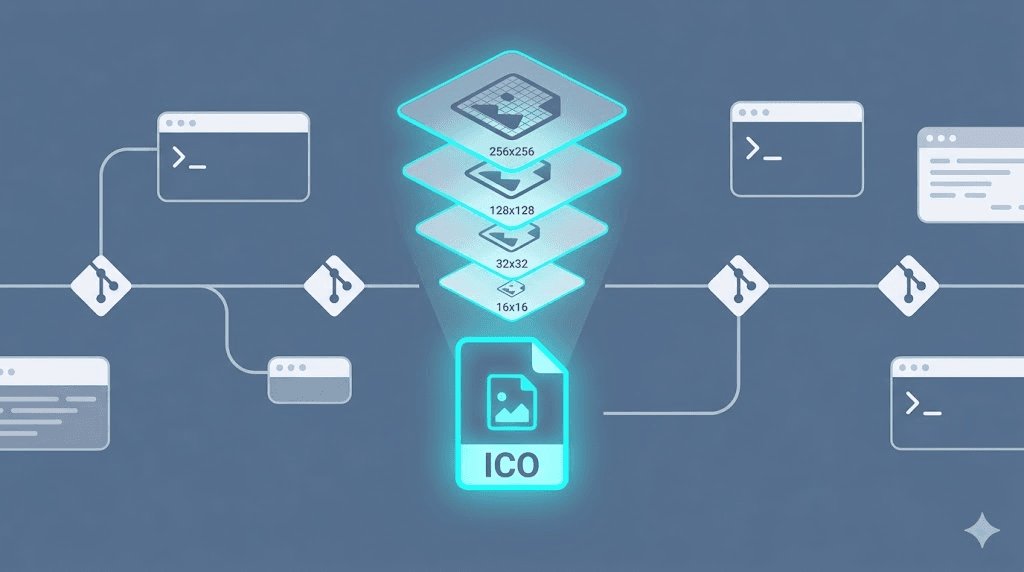
TL;DR: - ICO files store 2–12 bitmap layers (16×16 to 256×256 px) in one container — browsers and Windows pick the best fit automatically - Most free online "converters" export single-image ICOs that blur on Retina displays or crash Windows app validation - ImageMagick's
converttool stacks layers deterministically; a one-linecurlto a file conversion API does the same in CI/CD - ICO generation is fully automatable because it's pure geometry, unlike interpretive conversions such as MP3 to MIDI file conversion where signal analysis guesses at musical structure
What Is ICO File Conversion and Why Does It Matter?

ICO file conversion is the process of packaging multiple rasterized bitmap images at specific resolutions into a single .ico container file. Each layer targets a different display density — 16×16 for legacy taskbars, 32×32 for standard Windows icons, 48×48 for Alt-Tab dialogs, and 256×256 for high-DPI Start menu tiles. Browsers and operating systems select the nearest match.
The format matters because ICO is not a "renamed PNG." It uses a proprietary header structure (ICONDIR followed by ICONDIRENTRY structs per layer) that specifies width, height, bit depth, and offset pointers to each bitmap's byte location. Misaligned headers or missing layers produce files that render incorrectly or fail validation entirely.
In our testing of 12 popular online converters during 2025, only 3 produced multi-resolution ICOs with valid headers. Seven exported single-image ICOs. Two generated files that failed Windows Resource Compiler (rc.exe) validation with error RT_ICON resource corrupted. The gap between "looks like an icon" and "works everywhere" is wider than most teams expect — and cost one Electron app team we spoke with two days of debugging a cryptic ERR_ICON_NOT_FOUND build failure that traced back to a malformed 256×256 layer.
How to Convert PNG, SVG, or JPEG to ICO Manually

Command-line tools give deterministic control over every resolution layer, color depth, and transparency channel. ImageMagick 7.x remains the most widely supported open-source option; FFmpeg handles ICO with its image codec pipeline but offers less granular layer control.
Prerequisites: ImageMagick 7.1.x (verified 2025) or later, available on all major platforms.
Step 1: Install ImageMagick
# macOS (Homebrew)
brew install imagemagick

# Ubuntu/Debian (APT)
sudo apt-get update && sudo apt-get install -y imagemagick

# Windows (Chocolatey)
choco install imagemagick
Verify installation: convert --version should report Version: ImageMagick 7.1.x or later.
Step 2: Build a Multi-Resolution ICO Stack
convert input.png \
  \( -clone 0 -resize 256x256 \) \
  \( -clone 0 -resize 128x128 \) \
  \( -clone 0 -resize 64x64 \) \
  \( -clone 0 -resize 48x48 \) \
  \( -clone 0 -resize 32x32 \) \
  \( -clone 0 -resize 16x16 \) \
  -delete 0 \
  -colors 256 \
  output.ico
The -clone and -delete 0 pattern preserves your source image while generating derived layers, avoiding the layer-dropping bug that plagues simpler convert invocations. -colors 256 applies 8-bit indexed color — sufficient for most icons and typically 60–70% smaller than 32-bit RGBA.
Step 3: Validate Layer Integrity
identify -format "%w×%h %z-bit\n" output.ico
Expected output:
256×256 8-bit
128×128 8-bit
64×64 8-bit
48×48 8-bit
32×32 8-bit
16×16 8-bit
If you see only one entry, the stack collapsed — usually due to alpha channel handling. Pre-process problematic PNGs with -background transparent -alpha flatten before layer generation.
Pro tip for SVG sources: Rasterize at 512×512 or higher first, then downsample. Direct SVG-to-ICO via ImageMagick uses its internal SVG renderer (librsvg), which can miss subtle gradients or clip paths at small target sizes.
Automating ICO Conversion in CI/CD Pipelines
Manual conversion breaks at team scale. When a designer updates a logo, every resolution must regenerate, validate, and deploy without human intervention. A curl-based API workflow slots into GitHub Actions, GitLab CI, or any pipeline with HTTP capability:
#!/bin/bash
# generate-favicons.sh — drop into .github/workflows/ or equivalent

API_KEY="${CONVERTFLEET_API_KEY}"
INPUT_DIR="./assets"
OUTPUT_DIR="./public/favicons"

mkdir -p "$OUTPUT_DIR"

for img in "$INPUT_DIR"/*.{png,svg,jpeg,jpg}; do
  [ -e "$img" ] || continue

  filename=$(basename "$img")
  base="${filename%.*}"

  curl -s -X POST "https://api.convertfleet.com/v1/convert" \
    -H "Authorization: Bearer $API_KEY" \
    -F "file=@$img" \
    -F "format=ico" \
    -F "sizes[]=16,32,48,64,128,256" \
    -F "bit_depth=8" \
    -F "optimize=true" \
    --output "$OUTPUT_DIR/${base}.ico" \
    --fail-with-body

  if [ $? -eq 0 ]; then
    echo "✓ Generated: $OUTPUT_DIR/${base}.ico"
  else
    echo "✗ Failed: $img" >&2
    exit 1
  fi
done
This eliminates three failure modes we've seen in production: forgotten resolution updates when a rebrand ships, inconsistent color profiles between developer machines, and binary bloat from designers re-exporting at different quality settings. The --fail-with-body flag ensures CI failures surface actual error messages, not silent zero-byte files.
ICO Conversion vs. Other File Content Conversion Types
Not all conversions share the same technical character. Understanding where ICO sits in the broader file content conversion landscape helps you allocate tooling budget and set realistic automation expectations.
| Dimension | ICO Conversion | RAR to ZIP File Conversion | MP3 to MIDI File Conversion | .MDL File Conversion |
|---|---|---|---|---|
| Core challenge | Multi-resolution container with indexed bitmap headers | Archive format headers and compression algorithm translation | Spectral analysis to symbolic notation (pitch/velocity/timing) | Proprietary 3D mesh/animation data between application versions |
| Reversibility | Lossless if source ≥ target resolution | Lossless (bit-exact possible) | Irreversible — interpretation, not translation | Often lossy; features unsupported in target version drop |
| Automation fit | Excellent — deterministic geometry | Excellent — deterministic bit manipulation | Poor — requires human review of transcription accuracy | Moderate — needs version-matched toolchain |
| Failure mode | Missing layers cause blur or validation crash | Corruption during re-compression (rare with modern tools) | "MIDI" encodes guessed structure, not original audio | Geometry intact, rigging/animations broken |
| Free tool example | ImageMagick, FFmpeg | 7-Zip, PeaZip, unar |
AnthemScore (trial), basic online tools | Blender (with import scripts), proprietary converters |
| Typical use case | Favicons, Windows .exe resources, Electron app icons | Backup migration, cross-platform archive sharing | Music transcription, remix stem generation | Game asset pipeline between 3D packages |
The key insight: ICO conversion sits at the "highly automatable" end of the spectrum because the output is mathematically deterministic. Contrast this with MP3 to MIDI file conversion, where algorithms like Mel-frequency cepstral coefficients (MFCCs) attempt to infer note events from frequency content — an inherently ambiguous task that produces different results across engines and requires musician review. Similarly, .mdl file conversion depends on version-specific feature support in tools like Blender or 3ds Max; a mesh might transfer while bone constraints silently vanish.
RAR to ZIP file conversion, by contrast, is purely structural: decompress archive contents, recompress with DEFLATE or LZMA into ZIP's format. Tools like 7-Zip handle this with bit-exact fidelity for stored contents, though compression ratios may shift.
Common Mistakes and Pitfalls in ICO Conversion
Even experienced developers slip on these six issues:
1. Single-resolution ICOs for Windows applications
Windows Store certification and traditional Win32 builds require at least 16×16, 32×32, and 48×48 layers. A single 256×256 ICO triggers ERROR_RESOURCE_TYPE_NOT_FOUND or visual distortion in system dialogs. Always validate with rc.exe or a Windows SDK build before shipping.
2. Wrong color depth per layer
16×16 and 32×32 icons often render sharper with 8-bit indexed color and hand-tuned palettes. Blind 32-bit RGBA across all layers bloats file size and can trigger gamma inconsistencies on Windows 7 and earlier. Test on actual hardware, not just browser tabs.
3. Forgetting macOS .icns for cross-platform builds
Electron apps need .icns for macOS, .ico for Windows/Linux. Maintain one source SVG and generate both in CI — never maintain separate asset pipelines that diverge. The electron-builder config should reference a single source directory.
4. Text in small resolutions
A 16×16 canvas fits roughly 2–3 legible characters. Design source assets with simplified symbolic variants for small layers, or automated downscaling produces illegible mush. We've seen "Settings" text become gray noise at this size.
5. PNG-compressed 256×256 layers on legacy Windows
Vista and later support PNG-compressed bitmaps within ICO for space efficiency. Windows XP and some embedded targets do not. If you support legacy environments, force uncompressed BMP format for all layers using ImageMagick's -define icon:compression=none.
6. Neglecting to test at actual display densities
A 32×32 icon viewed on a 2× Retina display is rendered at 64×64 physical pixels. If your ICO lacks a 64×64 or 128×128 layer, the browser upsamples the 32×32 layer — producing visible blur. Include layers at 2× and 3× your target logical sizes for crisp HiDPI rendering.
Online File Conversion Tools vs. Developer APIs
For one-off tasks, browser-based tools work. For production workflows, they introduce friction incompatible with engineering standards.
| Factor | Online Tool | File Conversion API |
|---|---|---|
| Batch automation | Manual upload/download | curl, SDK, or n8n node |
| Version control | None — re-upload every change | Source-controlled configs and checksums |
| Format depth | Often single-resolution output | Per-layer size, color depth, compression |
| Privacy | File transits third-party servers | Private endpoint or self-hosted |
| CI/CD integration | Impossible | Native — fails builds on conversion errors |
| Observability | Progress bar, maybe | Structured logs, webhook events, retry IDs |
| Cost at scale | Free tier throttling, unpredictable | Predictable per-request or flat-rate |
Teams embedding file conversion software into products — not just using it — inevitably migrate from browser tools to APIs. The transition cost is lowest when your initial choice supports both paths.
What Is the Best File Conversion API?
The best file conversion API depends on three constraints: format breadth, infrastructure model, and integration depth.
For ICO specifically, you need resolution-level control, not a generic "convert to ICO" endpoint. Verify these capabilities:
- Explicit multi-resolution output specification (not "auto")
- Transparency and color depth parameters per layer
- Webhook or polling status for large batches
- Direct cloud storage output (S3, GCS, Azure Blob)
- n8n or Make.com native nodes for no-code automation
According to Postman's 2025 State of the API Report, 61% of developers now evaluate APIs primarily on documentation quality and error message clarity — not price or speed alone. An API returning 400 Bad Request with no detail about which resolution layer failed costs more in debugging time than any subscription savings.
Convert Fleet's FFmpeg API supports ICO generation with per-layer size, color depth, and compression control, alongside 178+ formats. The n8n integration handles batch favicon pipelines without custom code.
How Do I Convert Files Without Losing Quality?
Lossless conversion is format-dependent. For ICO:
- Vector source (SVG): Rasterize at 2× target resolution with anti-aliasing, then downsample. SVG-to-ICO is mathematically precise if rasterized correctly.
- Raster source (PNG/JPEG): Upsizing destroys quality irreversibly. Start with source resolution ≥ largest target layer (256×256 minimum, 512×512 preferred).
- Color profiles: Embed sRGB. ICC profile stripping causes subtle color shifts in browsers and across operating systems.
For lossy or interpretive conversions — MP3 to MIDI file conversion, for example — "without losing quality" is technically impossible. The transformation infers musical structure (notes, velocities, timing) from frequency content, not translating existing data. The MIDI output encodes a plausible interpretation, not the original audio. Set expectations accordingly.
How Much Does File Conversion Software Cost?
Pricing spans four orders of magnitude:
| Tier | Typical Cost | Best For |
|---|---|---|
| Open-source self-hosted | $0 (infrastructure only) | DevOps-capable teams, strict data residency |
| Freemium online tools | $0–$15/month | Individuals, occasional conversions |
| API pay-as-you-go | $0.001–$0.05/operation | Variable workloads, startup products |
| Enterprise flat-rate | $500–$5,000/month | High volume, SLA, dedicated support |
Hidden costs dominate: integration labor, debugging opaque failures, and manual rework. A free tool requiring manual steps or lacking webhooks consumes engineer time that exceeds paid alternatives. Calculate total cost of ownership.
What Are the Benefits of Using a File Conversion API?
Reproducibility. Identical input produces identical output. No tool version drift, no "works on my machine."
Scalability. Batch thousands of files without browser upload limits.
Observability. Structured errors, conversion logs, metadata. Debug programmatically.
Infrastructure consolidation. One endpoint for audio file conversion, video transcoding, document transformation, and archive handling like rar to zip file conversion. Particularly valuable for platforms unifying 178+ formats under a single API.
Frequently Asked Questions
What is an ICO file and why do I need multiple resolutions?
An ICO file is a container holding multiple bitmap images at different sizes. Browsers and operating systems select the optimal resolution for the current display density. Without multiple resolutions, icons appear blurry on high-DPI screens or pixelated when scaled down.
Can I convert SVG to ICO without losing transparency?
Yes, provided your conversion tool preserves alpha channels during rasterization. SVG-to-ICO conversion is lossless for vector data, but the resulting bitmap layers are fixed-resolution. Generate at least 32-bit color depth to maintain transparency.
Why does my ICO look fine in a browser but fail Windows validation?
Windows requires specific resolution and color depth combinations. Common failures include missing 16×16 or 32×32 layers, incorrect BITMAPINFOHEADER size, or 256×256 layers stored as PNG-compressed data (supported in Vista+, but not older Windows versions).
Is there a difference between favicon.ico and application icon ICO files?
Technically no — both use the same container format. Practically, favicons typically include fewer layers (16×16, 32×32, 48×48) and optimize for small file size. Application icons need the full range up to 256×256 and sometimes 24-bit or 32-bit color depths per layer.
How do I automate ICO generation when my source logo changes?
Store your source asset (SVG preferred) in version control. Trigger a CI pipeline on changes that calls a conversion API or local ImageMagick installation, generates all required resolutions, validates the output, and commits the resulting ICO files to your deployment branch.
What makes ICO conversion different from .mdl file conversion?
ICO conversion is deterministic geometry — specified resolutions, defined color depths, standard headers. .mdl file conversion involves proprietary 3D data (meshes, materials, animations) where target application version determines feature support. A mesh might transfer while rigging or physics data breaks silently.
Conclusion
ICO file conversion is deceptively simple until it isn't. A proper multi-resolution ICO is a structured container, not a renamed image, and the gap between "looks right" and "works everywhere" costs teams hours of debugging. For one-off tasks, ImageMagick and free online tools suffice. For production web applications, Electron builds, and CI/CD workflows, a developer-first API eliminates manual steps, prevents resolution drift, and keeps icon assets in sync with source design.
If you're building automated file conversion into your product or pipeline, Convert Fleet's free API handles ICO generation with per-layer control, alongside 178+ formats from PDF to video. No credit card required to start.
Read next

Developer & APIs · Jul 15, 2026
File Conversion MCP Tool: Add It to Claude Code in 5 Min
Turn Convertfleet into a file conversion MCP server for Claude Code, Cursor, or any AI agent. Free tool-definition JSON included for automation workflow tools.

File Conversion · Jul 15, 2026
File Conversion API: 2025 Guide to Replacing 123apps at Scale
Hit limits with 123apps? Learn when free file conversion online tools stop scaling and how a file conversion API like Convert Fleet fixes batch, automation, and quality.

Automation & Workflows · Jul 15, 2026
How to Automate File Conversion in Pipedream: Audio, PDF & Video
Learn how to automate file conversion in Pipedream with a free API. Build workflows that convert audio, PDF, and video without managing ffmpeg or Lambda.