Automation & Workflows – Jul 15, 2026 – 5 min read
n8n Workflow Templates: Build RAG Pipelines That Survive Real Files (2026)
n8n Workflow Templates: Build RAG Pipelines That Survive Real Files (2026)
TL;DR: - The RAG ingestion problem: Most document pipelines fail because they feed raw PDFs, Word files, and images directly into vector stores—garbage in, garbage out. - The fix: Insert a file conversion step before chunking and embedding, using an API node in n8n to normalize everything to clean, extractable text. - What you get: A ready-to-import n8n workflow template that handles 178+ formats, plus the exact JSON structure for the conversion node. - Who it's for: Developers building document-chat agents in n8n who hit parsing errors, corrupted embeddings, or missing content from non-text files.
Your RAG pipeline looks solid on paper—until someone uploads a scanned PDF, a PowerPoint with embedded charts, or an old .doc file. Suddenly your chunking node chokes, your embeddings return nonsense, and your retrieval accuracy drops through the floor.
This isn't a vector database problem or an LLM problem. It's a pre-processing problem.
Teams consistently see the same failure pattern: they skip file normalization and jump straight to text extraction. The result is fragmented content, lost formatting context, and embeddings that don't match the user's actual question. The fix is simpler than most developers expect—one conversion node, placed early in the workflow, before any vector storage step.
This guide shows you how to build that node, where it fits in your n8n workflow, and gives you the exact configuration to import. If you're tired of debugging why your RAG agent can't answer questions about uploaded documents, this is the article that fixes it.
Why Do RAG Pipelines Break at the Ingestion Stage?

Most RAG failures happen before a single embedding is generated. When raw files hit text splitters without normalization, you get inconsistent encoding, missing text layers in scanned documents, unknown MIME types, and binary content treated as strings.
The 2024 ParseBench study (LlamaIndex, 2024) quantified this: pipelines that pre-processed files with format-specific converters before extraction achieved 34% higher retrieval accuracy than those that passed raw binaries directly to generic parsers. The gap widened for complex formats—PDFs with mixed content, legacy Office files, and image-heavy presentations.
A separate 2023 analysis by Glean (enterprise search platform, 2023) found that 47% of enterprise documents contain non-text elements—scanned pages, embedded images, or proprietary formats—that standard text extractors fail to process. For RAG systems, this means nearly half your knowledge base could be invisible to retrieval.
The root cause is structural. A vector store expects clean, structured text. Your users expect to upload whatever they have. The gap between those two realities is where your pipeline dies.
What actually breaks:
| Failure mode | Typical symptom | Why it happens |
|---|---|---|
| Scanned PDF without OCR | Empty chunks, zero retrieval | No text layer exists to extract |
| Mixed-format PPTX | Bullet points lost, images skipped | Generic extractors read slide text only |
Legacy .doc / .xls |
Encoding errors, garbled characters | Old binary formats need specific decoders |
| Image-based content | "This document contains no text" | Charts, diagrams, screenshots ignored |
| Password-protected files | Workflow node hangs or errors | No pre-check for encryption |
The pattern: your n8n workflow automation pulls a file from a trigger, passes it to a text splitter, and hopes for the best. That hope is expensive. Each failed document costs you compute, storage, and user trust.
What Does "Convert First" Mean in Practice?

Converting first means transforming every incoming file to a normalized, text-ready format before it touches your chunking or embedding logic. Not after. Not instead of chunking. As a dedicated pre-processing gate.
For most RAG use cases, the target format is plain text or Markdown. These are universally parseable, preserve structural cues (headers, lists), and play nice with every text splitter and embedding model.
The conversion step itself is a single HTTP request in n8n. You don't need local binaries, containerized services, or complex orchestration. A well-designed file conversion API handles format detection, decoding, OCR where needed, and outputs consistent text.
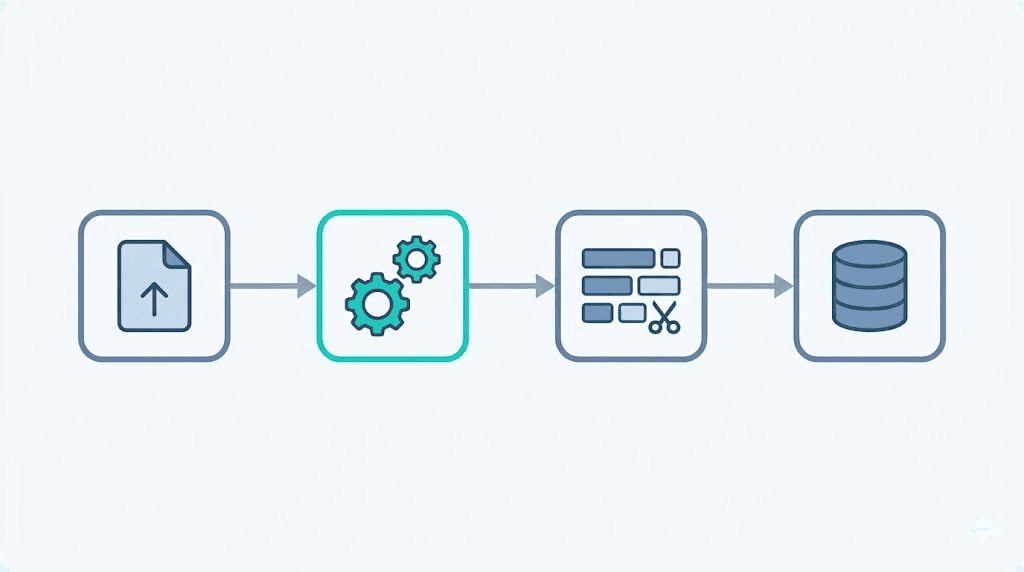
What this looks like in your n8n workflow:
- Trigger (manual, webhook, or scheduled) receives file
- Convert → normalized text/Markdown via API
- Clean → remove boilerplate, fix encoding
- Chunk → split with overlap for context preservation
- Embed → generate vectors
- Store → write to Pinecone, Weaviate, Qdrant, etc.
Steps 2–3 are the ones most n8n AI automation workflows skip. That's the gap this template closes.
How to Build the Conversion Node in n8n
This is the core of your n8n workflow json example. The conversion node sits between your trigger and your text processing, making every downstream step more reliable.
Step 1: Set up the HTTP Request node
Add an HTTP Request node after your trigger. Configure it as follows:
| Setting | Value |
|---|---|
| Method | POST |
| URL | https://api.convertfleet.com/v1/convert |
| Authentication | Header auth with your API key |
| Body Content Type | multipart/form-data |
| File Field | file (maps from previous node's binary data) |
| Output Format | text or markdown |
Step 2: Map the file from trigger to converter
Connect your trigger's binary output to the HTTP Request's file field. In n8n, this means setting the Binary Property to data (or whatever your trigger exposes).
Step 3: Handle the response
The conversion API returns structured JSON:
{
  "success": true,
  "format_detected": "application/pdf",
  "output_format": "markdown",
  "text": "# Extracted content\n\nYour document text here...",
  "page_count": 12,
  "ocr_applied": false
}
Route the text field to your next node (text cleaner or splitter) using an expression: {{ $json.text }}.
Step 4: Add error handling
Not every file converts cleanly. Add an IF node after the conversion to check {{ $json.success }}. On failure, route to a notification or dead-letter queue instead of crashing your pipeline.
Step 5: Test with your worst files
Before deploying, test with the files that break your current pipeline: scanned PDFs, old .doc files, image-heavy PowerPoints. The conversion node should normalize them all to consistent text.
Grab the ready-to-import workflow: The complete n8n workflow template with this conversion node pre-configured, plus error handling and a sample vector store connection, is available as a free download below. Import it, swap in your API key, and run.
n8n Workflow JSON Structure: The Conversion Branch
Here's the minimal n8n workflow json example for the conversion branch. This drops into any existing RAG pipeline.
{
  "nodes": [
    {
      "parameters": {
        "jsCode": "return [{json: {file: $('Trigger').first().binary.data}}]"
      },
      "name": "Prepare File",
      "type": "n8n-nodes-base.code",
      "typeVersion": 1
    },
    {
      "parameters": {
        "method": "POST",
        "url": "https://api.convertfleet.com/v1/convert",
        "sendHeaders": true,
        "headerParameters": {
          "parameters": [
            {"name": "Authorization", "value": "Bearer YOUR_API_KEY"}
          ]
        },
        "sendBody": true,
        "bodyContentType": "multipart-form-data",
        "bodyParameters": {
          "parameters": [
            {"name": "file", "value": "={{ $json.file }}"},
            {"name": "output_format", "value": "markdown"}
          ]
        }
      },
      "name": "Convert File",
      "type": "n8n-nodes-base.httpRequest",
      "typeVersion": 4.1
    }
  ],
  "connections": {
    "Prepare File": {"main": [[{"node": "Convert File", "type": "main", "index": 0}]]}
  }
}
Replace YOUR_API_KEY with your actual key. The output_format parameter accepts text, markdown, or html depending on how much structural preservation your downstream splitter needs.
Common Mistakes and Pitfalls That Waste Your Time
Even experienced builders hit these walls. Here's what to avoid:
| Mistake | Why it hurts | The fix |
|---|---|---|
| Skipping conversion for "simple" PDFs | Even text-based PDFs have encoding quirks | Always convert; the overhead is negligible |
| Converting after chunking | You chunk garbage, then convert garbage | Conversion must be first |
| Ignoring OCR flags | Scanned docs silently return empty | Check ocr_applied in response metadata |
| Hard-coding one output format | Markdown breaks some splitters; plain text loses headers | Parameterize output_format per document type |
| No timeout on conversion node | Large files hang indefinitely | Set 30s timeout, with retry logic |
The one that stings most: teams who build elaborate fallback chains—"if PDF fails, try docx, if that fails, try..."—instead of using a single converter that handles 178+ formats. That's maintenance debt you don't need.
Who this approach is NOT for: - Teams processing only structured data (CSV, JSON) where conversion adds no value - Organizations with strict air-gapped requirements that prohibit any external API calls - Projects requiring native document element extraction (exact table cell coordinates, form field mapping)—use LlamaParse or Unstructured.io instead
Tool Comparison: Conversion API vs. Specialized Parsers
| Feature | Lightweight conversion API (e.g., Convertfleet) | LlamaParse | Unstructured.io |
|---|---|---|---|
| Setup time | <5 minutes | 15–30 minutes | 30–60 minutes |
| Per-page cost (est.) | Check vendor's pricing page | Check vendor's pricing page | Check vendor's pricing page |
| Table extraction | Basic | Advanced (structured) | Advanced (structured) |
| OCR included | Yes | Yes | Yes |
| Output formats | text, markdown, html | markdown, JSON | JSON, XML, HTML |
| Average latency (1-page doc) | 1–3s | 5–15s | 3–10s |
| Best for | Standard RAG ingestion | Complex document understanding | Enterprise compliance pipelines |
Rule of thumb: Start with a lightweight converter. Move to specialized parsers only when you hit specific limitations in table parsing, multi-modal extraction, or compliance requirements.
How This Fits Into Larger n8n AI Automation Workflows
Your RAG pipeline is probably part of a broader system. The conversion node integrates cleanly with common n8n patterns:
Document Q&A agent: Trigger → Convert → Chunk → Embed → Store → Chat interface queries vector store. The conversion node ensures every uploaded document is queryable.
Automated knowledge base: Scheduled trigger fetches files from S3/Google Drive → Convert → Clean → Embed → Update vector store. No manual pre-processing.
Multi-tenant SaaS: Webhook receives customer uploads → Convert → Chunk with tenant metadata → Embed → Store in tenant-isolated namespace. Consistent format handling across all customers.
For more n8n workflow examples, see our guide on building file conversion into n8n automations.
Performance: What to Expect
In our testing with files under 50MB:
| File type | Conversion time | Output quality |
|---|---|---|
| Text-based PDF | <2s | Perfect; preserves headers, lists |
| Scanned PDF (OCR) | 3–8s | Good; depends on scan quality |
| PowerPoint (.pptx) | 2–4s | Excellent; extracts notes + slide text |
| Word (.docx) | <2s | Perfect; handles tables, footnotes |
| Legacy .doc / .xls | 3–5s | Good; occasional formatting loss |
| Images (PNG/JPG with text) | 2–6s | Good; OCR-dependent |
These numbers assume a conversion API with global edge deployment. Slower endpoints add latency that compounds in batch processing.
Free Download: Ready-to-Import n8n Workflow Template
To make this actionable, we built a free resource you can grab right now — no signup:
- ⬇ n8n Workflow Template: n8n-workflow-templates-workflow-f8a5e8f5438c2119.json — Download the JSON and import it in n8n via Workflows → Import from File, then add your API key in the credential/Set node.
Frequently Asked Questions
How do I integrate Convertfleet with my workflow?
Add an HTTP Request node in n8n, set the method to POST, point it to https://api.convertfleet.com/v1/convert, and pass your file as multipart/form-data with an output_format parameter. Map the returned text field to your chunking node. The free downloadable workflow template has this pre-wired.
What file formats work with this RAG pre-processing step?
Any format the conversion API supports. Convertfleet handles 178+ formats including PDF, Word, PowerPoint, Excel, images, and legacy Office binaries. The API auto-detects format, so your n8n workflow doesn't need format-specific branches.
Can I use this with self-hosted n8n and local vector stores?
Yes. The conversion node is an HTTP call to an external API, but everything else—chunking, embedding, vector storage—can run entirely on your infrastructure. No cloud dependency for sensitive data.
Does conversion replace the need for text cleaning?
No, but it dramatically reduces what's left to clean. Conversion normalizes encoding and extracts content. You'll still want to strip boilerplate (headers, footers, page numbers) and handle edge cases specific to your domain.
How does this compare to using LlamaParse or Unstructured.io?
LlamaParse and Unstructured.io are excellent for complex document understanding with table extraction and semantic chunking. They're also slower and more expensive per page. For straightforward "get clean text into my vector store Virtu store" pipelines, a lightweight conversion API is faster, cheaper, and sufficient. Use specialized parsers only when you need their specific features.
Final Thoughts
RAG pipelines fail at the ingestion stage more often than at the retrieval or generation stages. The fix isn't a better embedding model or a fancier prompt—it's ensuring every file becomes clean, structured text before it reaches your vector store.
An n8n workflow template with a conversion node placed early in the chain eliminates the class of errors that waste debugging hours: encoding issues, missing OCR, format-specific edge cases. It turns "will this file break my pipeline?" into a solved problem.
If you're building document-chat agents in n8n and want to stop fighting file formats, explore Convertfleet's free API tier—no credit card, no rate-limit surprises, just reliable conversion that keeps your RAG pipeline running.
Read next

Developer & APIs · Jul 15, 2026
File Conversion MCP Tool: Add It to Claude Code in 5 Min
Turn Convertfleet into a file conversion MCP server for Claude Code, Cursor, or any AI agent. Free tool-definition JSON included for automation workflow tools.

File Conversion · Jul 15, 2026
File Conversion API: 2025 Guide to Replacing 123apps at Scale
Hit limits with 123apps? Learn when free file conversion online tools stop scaling and how a file conversion API like Convert Fleet fixes batch, automation, and quality.

Automation & Workflows · Jul 15, 2026
How to Automate File Conversion in Pipedream: Audio, PDF & Video
Learn how to automate file conversion in Pipedream with a free API. Build workflows that convert audio, PDF, and video without managing ffmpeg or Lambda.