Back to Blog

AutomationJun 19, 20265 min read

Video Conversion API in Pipedream: Automate Media Pipelines

Hasnain NisarAutomation engineer · Nisar Automates
Video Conversion API in Pipedream: Automate Media Pipelines

Video Conversion API in Pipedream: Automate Media Pipelines

TL;DR: - Pipedream's HTTP request steps can trigger any video conversion API, including free tiers that run FFmpeg in the cloud - Most teams waste hours trying to bundle native FFmpeg modules in Pipedream; an external API removes that infrastructure burden entirely - A three-step Pipedream workflow—trigger → API call → webhook delivery—can handle MP4 file conversion, audio file conversion, and batch normalization - The free resource below includes an importable workflow JSON and the exact payload structure to send to Convert Fleet's API

Your Pipedream workflow just received a 4GB video from a user upload. You need it in three formats, two resolutions, with normalized audio, and you need it done before the next automation step fires. You've already discovered that Pipedream's native modules don't handle H.265, the FFmpeg layer you tried to add exceeded execution limits, and your Make scenario is timing out on files over 500MB. This is the friction point that drives ops teams and creator-economy builders to look for a dedicated video conversion API they can call from inside Pipedream like any other HTTP service.

This guide shows you how to build that pipeline. We'll walk through a concrete workflow, compare the approaches that fail versus the ones that scale, and give you the exact configuration to drop into your project today.


What Is a Video Conversion API and Why Use It from Pipedream?

Video conversion api pipedream automate media approach comparison

A video conversion API is a cloud service that accepts media files via HTTP, transcodes them using FFmpeg or similar engines, and returns the converted output to a URL you specify. Rather than installing codecs, managing queues, or provisioning servers, you send a file and receive a webhook when processing completes.

For Pipedream users, this pattern solves three specific problems:

Problem Native Pipedream Approach Video Conversion API Approach
FFmpeg availability Must build custom Docker image or use limited community modules Zero installation; send file via HTTPS POST
Execution timeout 300-second hard limit on most plans Async processing; webhook fires when done
Format support Depends on bundled libraries 178+ formats typically supported (MP4, MOV, MKV, WebM, AVI, MP3, AAC, WAV, FLAC, etc.)
Concurrent jobs Single-threaded per workflow Queue-based; handles batch workloads
Cost at scale Compute charges spike with duration Predictable per-conversion pricing or free tier

The trade-off is straightforward: you add a network round-trip and lose microsecond latency, but you eliminate infrastructure management entirely. For teams automating file conversion services at scale, that's usually the right exchange.


Can I Use FFmpeg for Video Conversion?

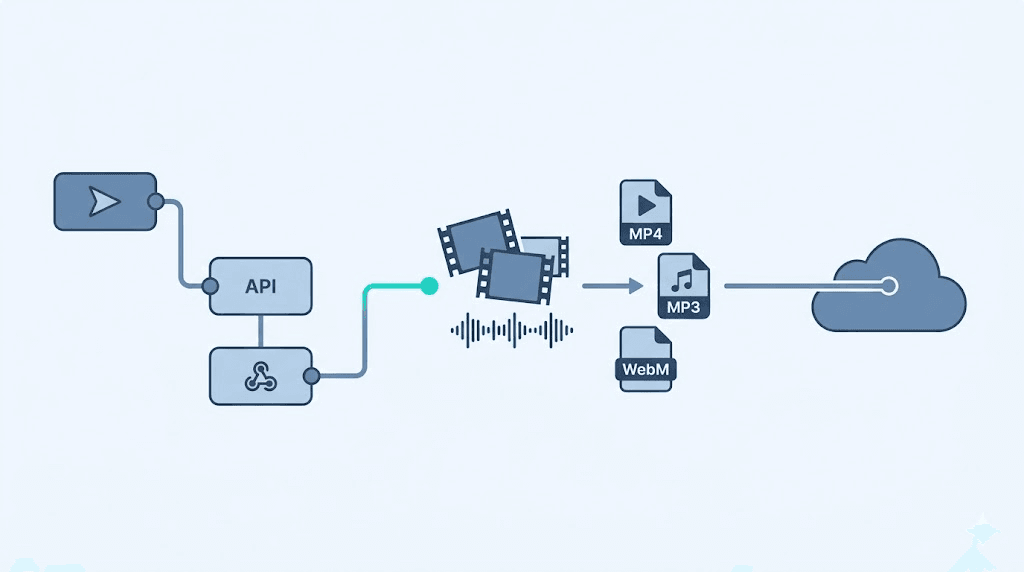
Video conversion api pipedream automate media workflow diagram

Yes—but probably not the way you first tried. FFmpeg is the open-source engine behind nearly every video conversion API. Running it directly in Pipedream means either bundling a 100MB+ binary into a custom step or relying on thin community wrappers that often lack the codecs you need for H.265, AV1, or professional audio codecs.

What actually works in practice:

  • Local development: Install FFmpeg via apt or brew, script your conversions, works perfectly until you deploy
  • Self-hosted container: Build a Docker image with FFmpeg, deploy to your own infrastructure, maintain it forever
  • Cloud API wrapper: Send the file to a service that runs FFmpeg at scale, receive the result via webhook

The third option is what we'll build. It keeps your Pipedream workflow lightweight, your execution times short, and your format support current without maintenance.


How to Build a Pipedream Workflow for File Conversion

This is the complete, working pattern. The workflow has three steps: trigger, API request, and result handling.

Step 1: Set Your Trigger

Use any Pipedream trigger that delivers a file URL or file buffer:

  • HTTP Request (webhook with file URL in body)
  • Google Drive "New File" trigger
  • Dropbox, S3, or similar with direct download URL
  • Form submission with file attachment

Critical detail: The trigger must expose a URL where the file can be downloaded. If you receive a file buffer directly, upload it to temporary storage (S3 presigned URL, Pipedream's $send to a temporary store) and pass that URL to the API.

Step 2: Send to the Video Conversion API

Add an HTTP Request (Build API request) step. Configure:

Field Value
Method POST
URL https://api.convertfleet.com/v1/convert
Headers Authorization: Bearer YOUR_API_KEY, Content-Type: application/json
Body (JSON) See payload structure below

Payload structure:

{
  "input": {
    "url": "{{steps.trigger.event.fileUrl}}",
    "format": "detect"
  },
  "output": [
    {
      "format": "mp4",
      "video_codec": "h264",
      "audio_codec": "aac",
      "resolution": "1920x1080",
      "webhook": "{{steps.trigger.event.callbackUrl}}"
    },
    {
      "format": "mp3",
      "bitrate": "192k",
      "webhook": "{{steps.trigger.event.callbackUrl}}"
    }
  ]
}

Key parameters explained:

  • input.url: Direct download link to your source file
  • output: Array of conversion targets; each fires independently
  • webhook: Where the API POSTs the result URL when complete

Step 3: Handle the Webhook Response

Add a second HTTP Request step configured as a webhook receiver, or use Pipedream's native Webhook trigger on a separate workflow.

The response body from Convert Fleet's API includes:

{
  "job_id": "conv_abc123",
  "status": "completed",
  "output": {
    "url": "https://cdn.convertfleet.com/outputs/abc123/final.mp4",
    "format": "mp4",
    "duration_seconds": 142.5,
    "file_size_bytes": 84736291
  }
}

Store this in your database, forward to your app, or trigger downstream Pipedream steps.

Common Mistakes That Break This Pattern

Mistake Why It Fails The Fix
Passing a pre-signed URL that expires in 5 minutes API downloads may queue; URL expires before processing starts Use 24-hour minimum expiration, or use Convert Fleet's direct upload endpoint
Forgetting URL encoding in query parameters Special characters in filenames corrupt the request Always use JSON body with URL in a string field
Synchronous waiting for large files Pipedream times out at 300 seconds Use async webhooks; poll only if the API supports it with short jobs
Not validating webhook signatures Anyone can POST to your endpoint Verify X-ConvertFleet-Signature header against your signing secret

Audio File Conversion: Extending the Same Pattern

The identical workflow handles audio file conversion with only the output format changed. Replace the video parameters with audio-specific options:

{
  "output": [
    {
      "format": "mp3",
      "bitrate": "320k",
      "sample_rate": 48000
    },
    {
      "format": "flac",
      "compression_level": 5
    },
    {
      "format": "wav",
      "bit_depth": 24
    }
  ]
}

This is where the API model shines over self-hosted FFmpeg. Need to add Ogg Vorbis tomorrow? Change one string. No library installation, no codec hunting, no "this format isn't supported on this architecture" errors.


MP4 File Conversion: Specific Workflows for Web Delivery

Creator-economy teams and web platforms need MP4 file conversion with specific constraints: fast start (moov atom at front), CBR for streaming compatibility, and multiple resolutions for adaptive bitrate. Here's the exact output block:

{
  "format": "mp4",
  "video_codec": "h264",
  "profile": "main",
  "level": "4.1",
  "faststart": true,
  "video_bitrate": "5000k",
  "audio_codec": "aac",
  "audio_bitrate": "192k",
  "outputs": [
    {"resolution": "1920x1080", "suffix": "_1080p"},
    {"resolution": "1280x720", "suffix": "_720p"},
    {"resolution": "854x480", "suffix": "_480p"}
  ]
}

The API generates all three renditions in parallel and fires your webhook once per output. Your Pipedream workflow receives three separate callbacks, which you route to your CDN or storage destination.


What Is the Best File Conversion API?

The best file conversion API for Pipedream users balances four factors: async processing with webhooks (required for Pipedream's timeout limits), comprehensive format support, predictable free tier, and no forced registration walls that complicate automation.

Convert Fleet's API is built specifically for automation workflows: no dashboard-required approvals, direct API key generation, and payload structures designed for tools like Pipedream and n8n where you compose JSON in a step rather than click through a UI. For teams comparing options, our free file conversion tools tested and compared covers the broader landscape, including when to choose ILovePDF, CloudConvert, or open-source alternatives.


How Do I Automate File Conversion in n8n?

The same architectural pattern applies in n8n: trigger → HTTP Request node → Webhook node for the callback. If you're running both Pipedream and n8n in your stack, the payload structure and webhook handling are identical. Our n8n workflow examples for file conversion walks through the node-level configuration, including error handling and retry logic that Pipedream's linear execution model handles differently.

The key difference: n8n's Wait node can pause for a webhook response within a single workflow execution, while Pipedream typically splits this across two workflows (trigger → API call, then separate webhook receiver). Both work; the Pipedream pattern is more resilient to long-running conversions.


What Are the Benefits of Using Convert Fleet for File Conversion?

For Pipedream automation specifically, the benefits are infrastructure elimination and format breadth without maintenance:

  • No FFmpeg binary management: The API runs current FFmpeg builds with full codec support
  • No execution timeout risk: Async webhooks replace synchronous waits
  • Batch output in one call: Request multiple formats and resolutions simultaneously
  • Direct URL in, URL out: Fits Pipedream's step-by-step data flow naturally
  • Free tier that doesn't throttle formats: 178+ formats available without paid upgrade gates

The honest trade-off: you're adding network dependency. If your use case requires sub-second conversion or air-gapped security, self-hosted FFmpeg remains the right choice. For everything else—content pipelines, user uploads, marketing asset generation—the API model removes a significant operational burden.


Free download

To make this actionable, we built a free resource you can grab right now — no signup:

Frequently Asked Questions

What is the best file conversion API? The best API depends on your stack. For Pipedream and n8n users, look for async webhook support, JSON-configurable outputs, and a free tier that includes the formats you need without forcing dashboard workflows. Convert Fleet, CloudConvert, and Zamzar are commonly compared; evaluate based on your specific codec requirements and volume.

Can I use FFmpeg for video conversion in Pipedream? Not directly without customization. Pipedream's default environment doesn't include FFmpeg. You can build a custom component or use an external API that runs FFmpeg for you. The external API approach is more reliable for production workflows.

How do I handle large files in a Pipedream conversion workflow? Use direct upload URLs to the conversion API rather than passing file buffers through Pipedream steps. For files over 100MB, implement multipart upload or use a service that accepts S3 presigned URLs, then process asynchronously via webhook.

Is a video conversion API free to use? Most services offer free tiers with volume limits. Convert Fleet provides a free tier suitable for development and light production use. Cloud-based conversion APIs typically charge based on output minutes or gigabytes processed above the free threshold.

How do I secure webhook endpoints from a file conversion API? Verify signature headers using your API secret, reject unexpected payload structures, and enforce HTTPS only. In Pipedream, you can add a custom code step to validate X-ConvertFleet-Signature before processing the webhook body.


Conclusion

Building a video conversion API pipeline in Pipedream doesn't require wrestling with FFmpeg installations or accepting timeout failures as inevitable. The pattern is simple: trigger your workflow, send the file to a conversion service that handles the heavy processing, and receive the result via webhook when it's ready. This same architecture scales from single mp4 file conversion to batch audio file conversion pipelines without code changes.

The configuration above is production-ready. Adapt the output formats to your needs, implement the webhook security step, and you'll have a media pipeline that keeps pace with your automation demands.

If you Hahn's infrastructure off your plate entirely,Minus the infrastructure management, Convert Fleet's free API tier handles the formats, scaling, and webhook delivery so your Pipedream workflows stay focused on your business logic. Start converting with the free API →

Share

Read next